
Editing a multicam podcast by hand can take hours of switching camera angles every time someone speaks. AutoPod, AutoCut, FireCut, and Cockpit can all detect who's talking and make those cuts for you inside Premiere Pro, but they differ quite a bit in speed, features, and price.
We ran all four on the same 54-minute podcast and compared how fast they were, how good the cuts were, and what they cost, so you can pick the right one for your workflow.
For transparency, this article is published by Sequence, the creators of Cockpit. The benchmark results come from our own testing. Some links to competing products are affiliate links, meaning we may earn a commission if you purchase through them.
Comparing the best automatic podcast editing plugins
Here's a quick comparison. Processing time is how long each plugin took to analyze the same 54-minute, three-camera podcast and make all of its camera cuts, from clicking the button to a finished edit:
| Plugin | Processing Time (54-min podcast) | Monthly Price | Free Trial |
|---|---|---|---|
| Cockpit | 14 seconds | $4.99 | 14 days |
| AutoPod | 42 seconds | $29 | 30 days |
| AutoCut | 55 seconds | $19.80 | 14 days |
| FireCut | 1 min 52 sec | $34 | 7 days |
Monthly prices reflect month-to-month billing. Processing times are from our test on a MacBook Pro with an M4 Max, and results will vary depending on your setup.
Cockpit is the most affordable option in this comparison and also had the fastest processing time in our test.
However, processing speed is only one part of the equation. You'll also want to consider how easy each tool is to set up, how much control you have over camera switches, and whether you need any additional editing features.
Let's take a closer look.
Which podcast editing plugin is the fastest?
Every plugin here saves you from making each camera switch by hand, but they don't all get there at the same speed. We timed all four on the same 54-minute podcast.
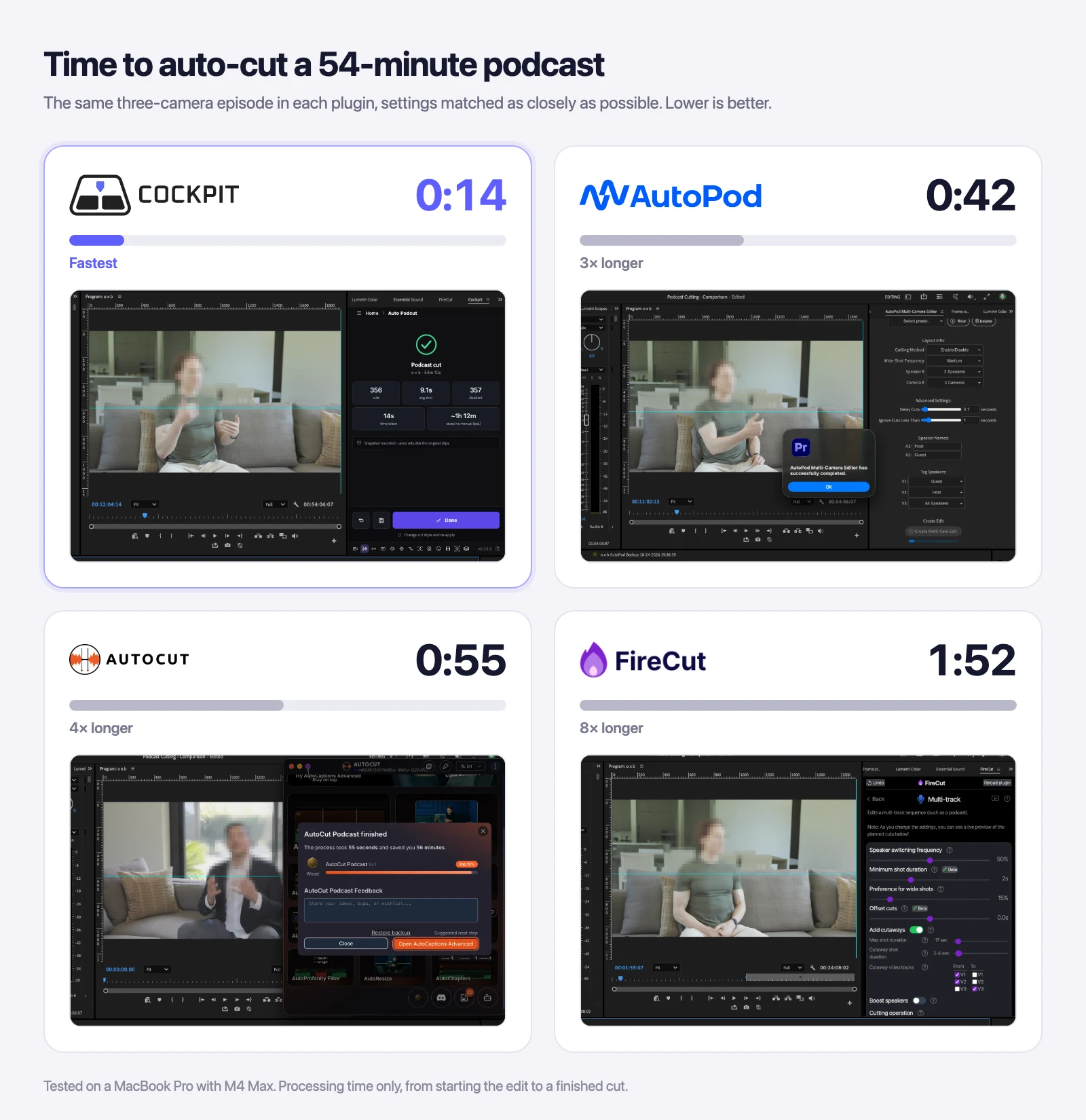
Cockpit finished in 14 seconds: three times as fast as AutoPod, about four times as fast as AutoCut, and eight times as fast as FireCut.
Of course, these results won't necessarily be the same for every project. Processing times can vary depending on your computer, the length of the recording, the number of cameras, and the settings used.
How good are the cuts?
Speed only matters if the cuts are worth keeping, so we watched through every result.
Honestly, the cut quality was close across all four. Each plugin switched to whoever was speaking, used the wide shot, and sometimes cut to the listener's reaction. None of them was perfect, and in every case fixing a shot took a click: enable a different camera's clip at that spot.
A few differences did stand out:
- AutoCut seemed to anticipate the switches, cutting to the next person just before they started talking, and it picked good reaction shots.
- AutoPod made strong choices on a short test clip. On the full episode, though, it held one shot for about 20 seconds through a back-and-forth where a reaction or wide shot would have helped, and it has fewer settings to change that.
- FireCut produced solid cuts, and it shows a live preview of the planned cuts as you change its settings.
- Cockpit produced natural-feeling cuts at its default settings, without switching too often, and it's easy to make it cut faster or use the wide shot more.
Since the cuts were so similar, the bigger differences came down to speed, setup, and price.
Setup and features compared
Before any of these plugins can cut your podcast, each camera and microphone needs its own track, synchronized with the others. That preparation, and how much control you get over the cuts, varied more than the cuts themselves.
| Cockpit | AutoPod | AutoCut | FireCut | |
|---|---|---|---|---|
| Works inside Premiere | Panel | Panel | Separate app | Panel |
| Spreads and cleans up clips for syncing | Yes | No | No | No |
| Assigns speakers to tracks | Automatically | Manually | Manually | Manually |
| Saved presets | Yes | Yes | Yes | Not that we found |
| Control over the cutting | Pace, reactions, wide shots, advanced settings | A few settings | Priorities, reactions, shot lengths | Many sliders, with a live preview |
| Undo | One click | Backup sequence | Restore backup | One click |
| Free trial | 14 days | 30 days | 14 days | 7 days |
Based on our hands-on testing in October 2026. Features change often, so check each plugin's latest version.
None of the other three could spread the clips onto their own tracks, so for every plugin we did that step in Cockpit first.
Cockpit: Fast multicam editing and timeline preparation
Cockpit is a Premiere Pro plugin that combines a keyboard-driven command palette with a collection of editing tools.
One of those tools is Auto Podcut, which automatically creates camera cuts based on who's speaking.
For example, if you're editing a podcast with a host, a guest, and a wide-angle camera, Auto Podcut can automatically switch between those shots throughout the recording.
You can also adjust the pacing of the edits and decide how unused camera clips should be handled.
Prepare your timeline with Spread & Clean Up
One particularly useful part of Cockpit's workflow is Spread & Clean Up.
Before automatically cutting between cameras, you need your footage organized and synchronized.
If you've ever imported a podcast recording with several cameras and microphones, you know that getting everything lined up and organized can be tedious before you've even started editing.
Spread & Clean Up puts each camera and microphone clip on its own track, so you can select them all and use Premiere's Synchronize to line them up. Then Clean Up trims the overhanging edges, leaving a tidy timeline ready for Auto Podcut.
Instead of manually reorganizing everything, you can handle more of that preparation within Cockpit before moving on to your camera cuts.
Automatically cut between speakers
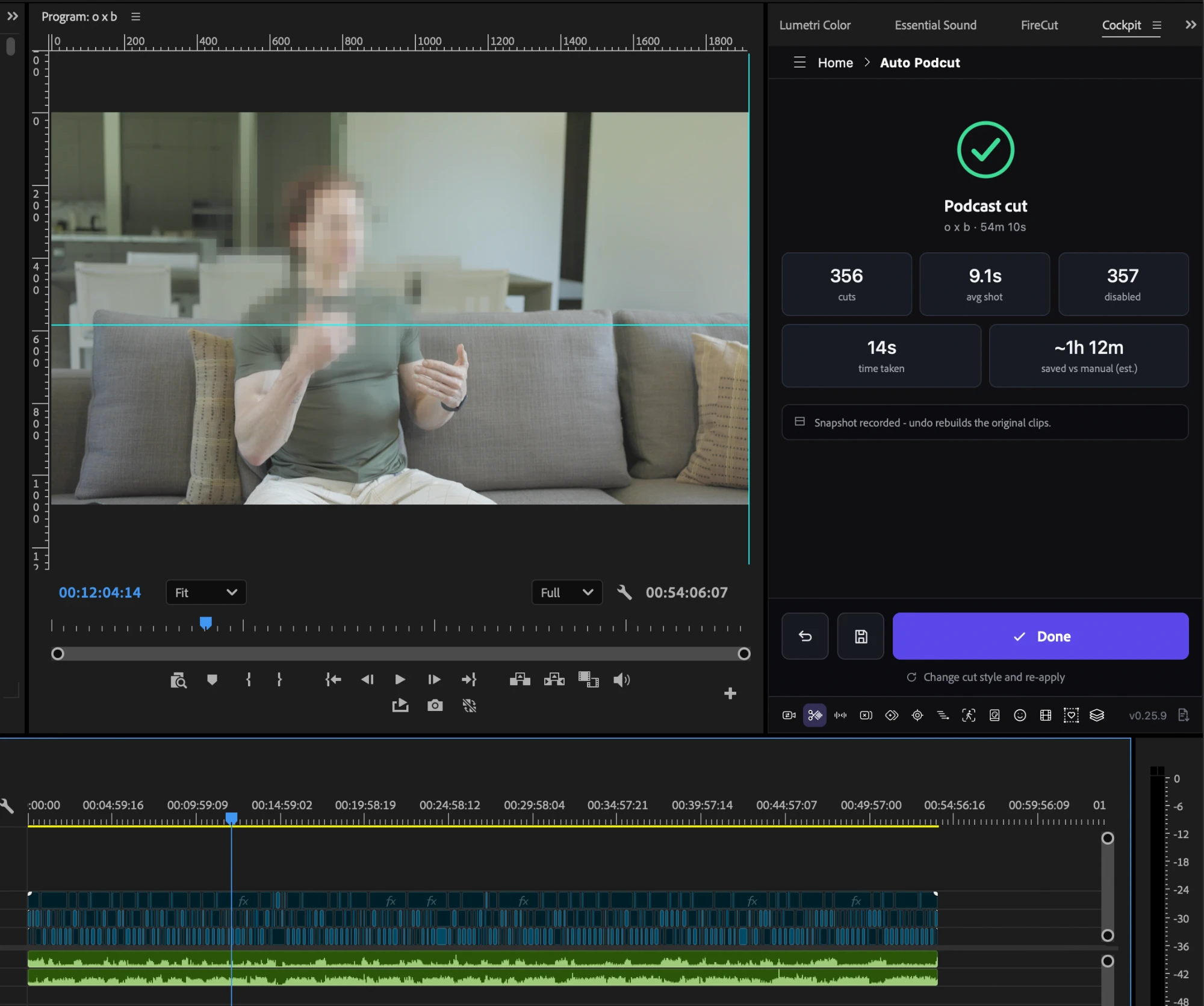
Once your footage is ready, Auto Podcut can generate your initial multicam edit.
Here's the general workflow:
- Prepare your footage using Spread & Clean Up and make sure your cameras and microphones are synchronized.
- Open Auto Podcut through Cockpit.
- Check your speakers. Auto Podcut detects each speaker and assigns their microphone and camera tracks, plus the wide shot. It won't always get this exactly right, but it's quick to change.
- Save the setup if you record the same show with the same setup every time, so next time it's one click.
- Analyze the recording to identify who's speaking.
- Adjust the editing settings to control how frequently camera angles change.
- Apply the edits and review the resulting timeline.

You can choose between different pacing styles, including Calm, Paced, Energetic, and Rapid, depending on how frequently you want camera angles to change.
You can also configure how Auto Podcut handles unused camera footage, either disabling the unused clips or removing them.
This gives you a useful first pass without needing to sit through the entire podcast making every camera switch yourself. It won't get every cut perfect, but it gets you most of the way there, so you can spend your time tightening pauses, cutting bad takes, and pulling out moments for the intro.
More than just a podcast editing plugin
One of Cockpit's biggest advantages is that Auto Podcut is only one of its tools.
Cockpit also includes features for:
- Removing silences and bad takes.
- Motion tracking directly inside Premiere Pro.
- Batch exporting clips and sequences.
- Repositioning anchor points.
- Searching and applying effects, transitions, and presets with keyboard shortcuts.
- Running Premiere Pro commands and other editing tools.
So even when you're not editing a podcast, Cockpit can help speed up other parts of your workflow.
All 15 included tools are available with the $4.99 monthly subscription or the $74.99 lifetime license.
What we like:
- Fastest processing time in our test at 14 seconds.
- Spread & Clean Up spreads and cleans up your clips so syncing is quick, which none of the others could do.
- Detects speakers and assigns their tracks for you.
- Saved setups for shows you record the same way every time.
- Customizable camera switching and pacing, with one-click undo.
- Includes 15 Premiere Pro productivity tools.
- $4.99/month or $74.99 lifetime.
- 14-day free trial with no credit card required.
Things to consider:
Cockpit requires Premiere Pro 25.6 or newer. And as with any automatic edit, you'll still want to review the result before exporting.
If you want affordable automatic podcast editing alongside tools that can improve the rest of your editing workflow, Cockpit is a strong option.
AutoPod: Dedicated podcast editing tools
AutoPod is one of the more established plugins for automatically editing video podcasts.
Its Multi-Camera Editor analyzes who's speaking and creates camera switches based on the conversation.
It supports up to 10 speakers and different camera configurations, including individual shots, two-person shots, and wide angles.
Its settings are deliberately simple: a cutting method, how often to use the wide shot, the number of speakers and cameras, and a couple of timing sliders. You name your speakers, tag each camera, and AutoPod makes the rest of the decisions for you.
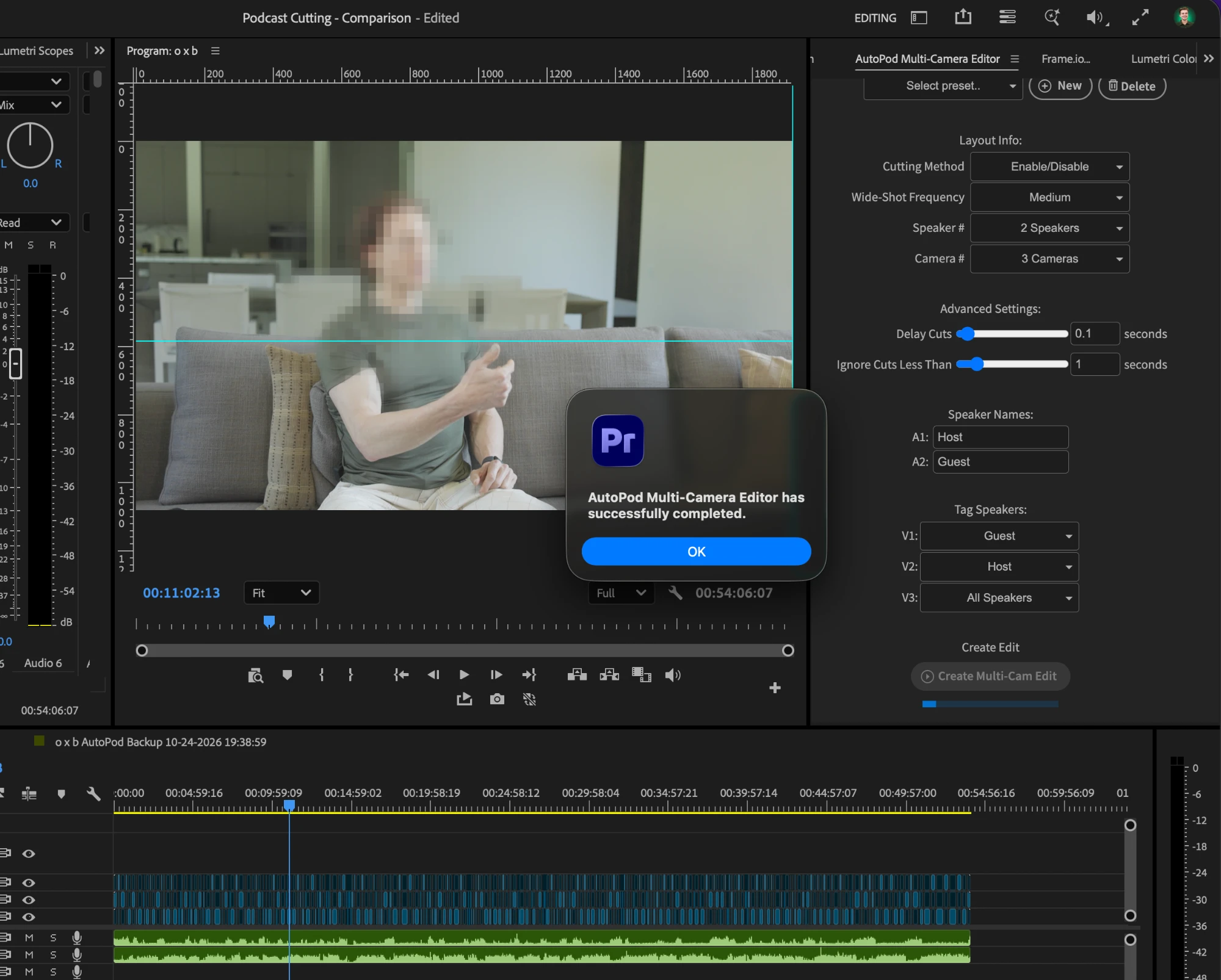
Beyond multicam editing, it includes a Social Clip Creator for repurposing footage into different aspect ratios and a Jump Cut Editor for removing silent sections.
What we like:
- Strong camera choices with very little setup.
- Supports up to 10 speakers and multiple camera configurations.
- Saved presets.
- Includes social clip creation and jump-cut tools.
- 30-day free trial.
Things to consider:
AutoPod costs $29 per month, making it considerably more expensive than Cockpit.
Its simplicity cuts both ways. On our 54-minute test it held one shot for about 20 seconds where a reaction or wide shot would have helped, and there's less you can adjust to change that.
There's no one-click undo; to go back, you use the backup sequence it creates. And you'll need to spread and sync your clips some other way first.
It was the second-fastest plugin in our test, at 42 seconds.
AutoCut: Multicam editing with additional AI features
AutoCut is another popular editing plugin for Premiere Pro and DaVinci Resolve.
Its AutoCut Podcast tool switches between cameras based on who's talking. Unlike the others, it isn't a panel you dock in Premiere: it runs as a separate app alongside it.
You add a speaker for each microphone track, set their camera tracks, then choose camera priorities, reaction shots, and shot durations.
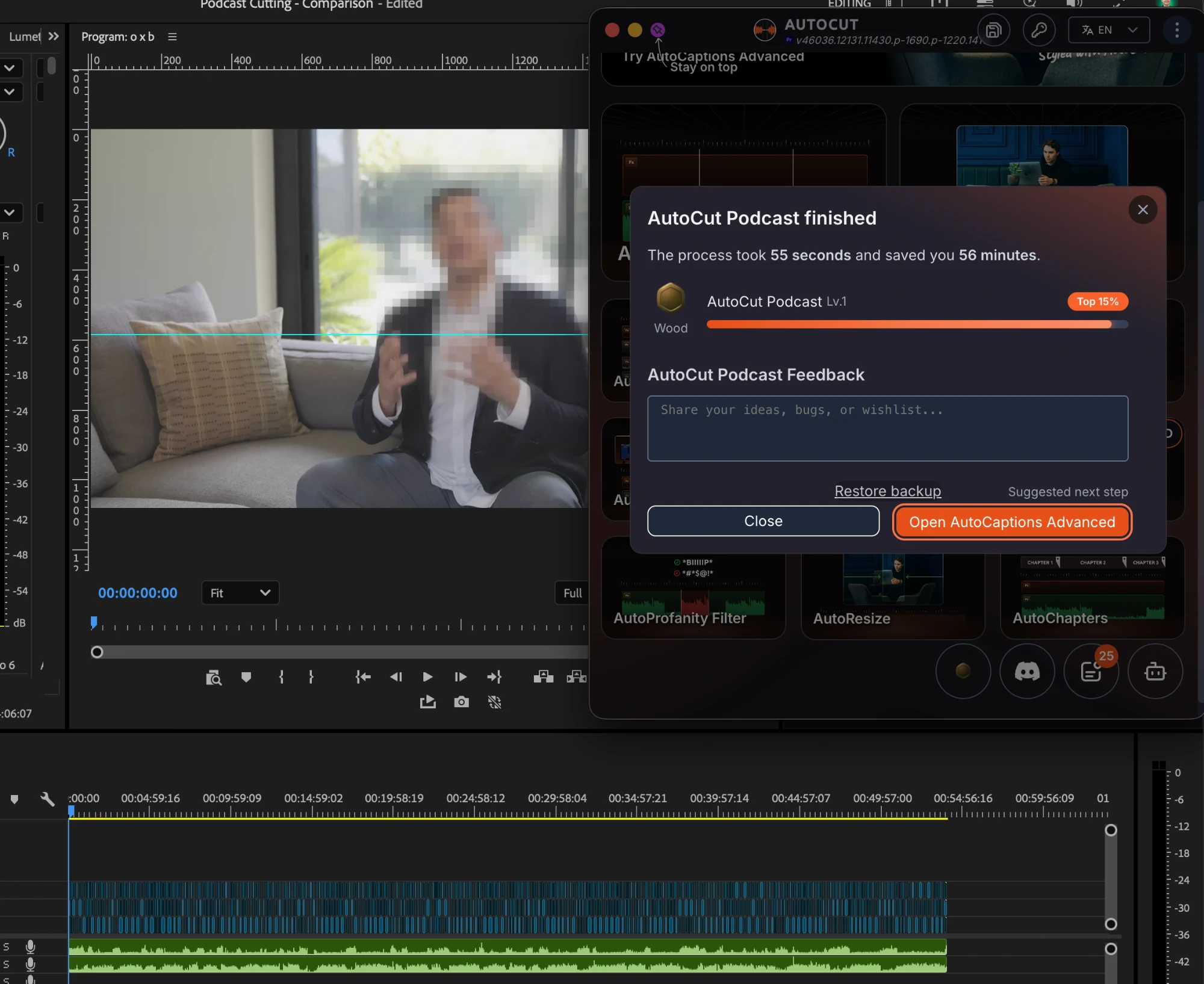
AutoCut also offers additional functionality beyond podcast editing, including automatic captions, silence removal, zoom effects, B-roll generation, and repeated-take detection.
What we like:
- A good balance of cuts that anticipates who's about to speak.
- Good reaction shots.
- Customizable shot durations, camera priorities, and saved presets.
- Additional AI-powered tools for captions, zooms, and B-roll.
- Available for Premiere Pro and DaVinci Resolve.
- 14-day free trial.
Things to consider:
AutoCut Podcast requires its AI plan, which costs $19.80 per month or $178.80 per year when billed annually.
Because it's a separate app, it has to open every time you use it, which adds a few seconds to each edit. It also couldn't spread our clips onto their own tracks, so we did that step in Cockpit first.
If you're interested in its additional AI-powered features, AutoCut may be worth considering despite the higher price.
FireCut: Automatic editing and AI-powered tools
FireCut is an editing plugin for Premiere Pro that offers automatic multicam editing alongside several other tools.
Its Multi-track feature can detect which speaker is active and automatically switch between camera angles.
You add each speaker yourself, which is quick and clean, then click Analyze. After that, there's a lot to adjust: switching frequency, minimum shot length, preference for wide shots, offset cuts, cutaways, and more. As you change them, a live preview shows the planned cuts on your timeline.
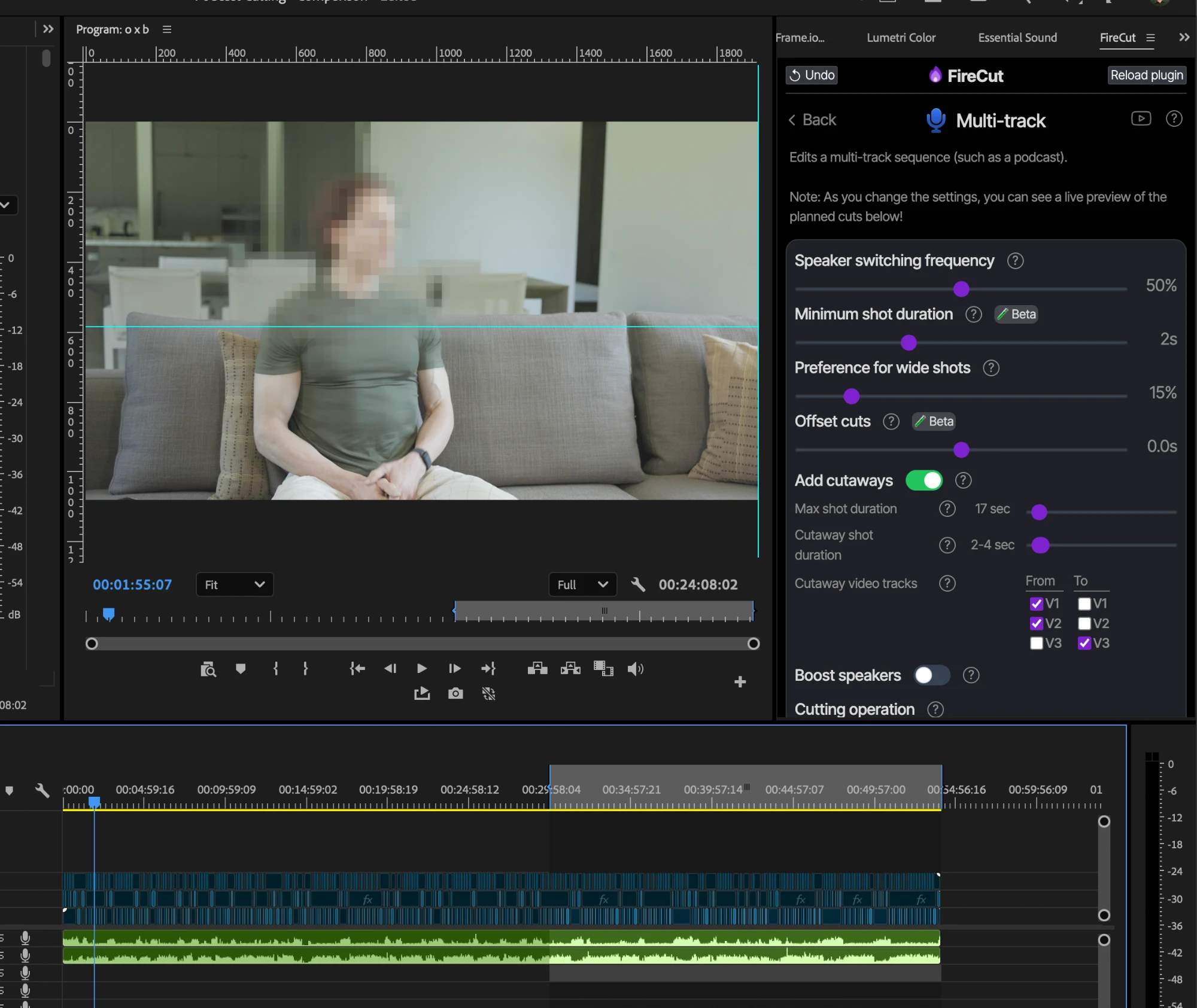
FireCut has a broader collection of AI-powered tools as well, including automatic captions, silence removal, filler-word detection, B-roll, and other editing features.
What we like:
- Clean, easy speaker setup.
- Lots of control, with a live preview of the planned cuts.
- One-click undo.
- Additional tools for audio cleanup, captions, and B-roll.
- Available for Premiere Pro and DaVinci Resolve.
- 7-day free trial.
Things to consider:
FireCut's podcast editing functionality requires its Pro plan, which costs $34 per month or $240 per year when billed annually.
It was also the slowest in our test, at 1 minute and 52 seconds. That won't be true of every project, but the gap to Cockpit was noticeable.
We also didn't find a way to save presets, so you'll set it up again for each episode. And with so many settings, it can take a moment to find your way around at first.
FireCut may be a better fit if you're specifically looking for its broader collection of AI-assisted post-production features.
Which plugin offers the best value?
If your main goal is to automatically edit multicam podcasts, pricing is worth considering.
All four plugins offer monthly subscriptions, but the differences become more noticeable when you compare the cost over an entire year.
Here's how much each plugin costs:
| Plugin | Monthly Cost | Yearly Cost | Lifetime Cost |
|---|---|---|---|
| Cockpit | $4.99 | $59.88 | $74.99 |
| AutoCut | $19.80 | $178.80 | Not offered |
| AutoPod | $29 | $319 | Not offered |
| FireCut | $34 | $240 | Custom quote |
Prices checked October 2026, excluding applicable taxes. Monthly costs show month-to-month billing. Yearly costs use available annual discounts where applicable. Cockpit's yearly amount is 12 monthly payments because it does not require annual billing. FireCut offers lifetime licensing by request, but does not publicly list a fixed price.
Cockpit's lifetime license makes a big difference
Cockpit is the only plugin in this comparison with a publicly listed lifetime price of $74.99.
That means you can pay once and continue using Cockpit without worrying about another monthly subscription.
For comparison, one year of AutoPod costs $319 on its annual plan, while Cockpit's lifetime license costs just $74.99.
That's a difference of more than $240 in the first year alone.
AutoCut and FireCut are also considerably more expensive over a full year, although both include additional AI features that may be worth paying for depending on your workflow.
And since Cockpit includes more than just automatic podcast editing, you're also getting access to its other Premiere Pro productivity tools.
If you primarily want automatic camera switching, and would rather avoid another recurring software expense, Cockpit offers excellent value.
Which automatic podcast editing plugin should you choose?
All four plugins can save you a considerable amount of time compared to manually editing a multicam podcast.
The best option ultimately depends on what you need.
Cockpit is our pick for editors who want fast, affordable automatic podcast editing alongside a broader collection of Premiere Pro tools. It was the only one that handled the footage preparation too, and it detects your speakers and saves your setup for next time.
AutoPod is worth considering if you'd rather have fewer decisions to make and let the plugin choose the cuts for you.
AutoCut is a good option if you want automatic podcast editing alongside a range of AI-powered editing features.
FireCut is another alternative if you're looking for a broader AI-assisted editing toolkit rather than just automatic camera switching.
Based on our speed test, Cockpit was the fastest of the four plugins, while also offering the lowest advertised price for podcast editing.
And with its additional editing tools and fixed-price lifetime license, it's a particularly compelling choice for Premiere Pro editors.
If you'd like to see how it works, we've also put together a step-by-step guide to automatically editing multicam podcasts in Premiere Pro.
Otherwise, you can try Cockpit yourself for 14 days with no credit card required.
Download Cockpit and start your free trial
Frequently asked questions
What is the best plugin for automatically editing podcasts in Premiere Pro?
Cockpit, AutoPod, AutoCut, and FireCut are all options for automatic podcast editing in Premiere Pro.
Cockpit is worth considering for its speed, pricing, and additional editing tools, while AutoPod, AutoCut, and FireCut offer different specialized or AI-assisted features.
Which automatic podcast editing plugin is the fastest?
In our testing on a 54-minute podcast, Cockpit was the fastest, completing the processing step in 14 seconds.
AutoPod took 42 seconds, AutoCut took 55 seconds, and FireCut took 1 minute and 52 seconds.
Actual performance will depend on your footage, hardware, plugin versions, and editing settings.
Is there a cheaper alternative to AutoPod?
Yes. Cockpit costs $4.99 per month or $74.99 for a lifetime license, compared to AutoPod's $29 monthly subscription.
AutoCut and FireCut also offer automatic podcast editing through their paid plans.
Can Premiere Pro automatically switch cameras based on who's speaking?
Premiere Pro has built-in multicamera editing tools, but automatically switching based on the active speaker generally requires an additional plugin.
Tools like Cockpit, AutoPod, AutoCut, and FireCut can automate those initial camera cuts.
Do I need to synchronize my cameras before editing?
You should make sure your cameras and microphone tracks are properly synchronized before generating your final multicam edit.
Cockpit's Spread & Clean Up step can help organize and prepare clips for synchronization before using Auto Podcut.
In our testing, AutoPod, AutoCut, and FireCut couldn't spread the clips onto their own tracks, so you'll need to do that some other way before using them.
Which podcast editing plugins offer lifetime licenses?
Cockpit offers a publicly advertised lifetime license for $74.99, including future tools and updates.
FireCut also offers lifetime access through a custom pricing request.
AutoPod and AutoCut do not currently advertise lifetime licenses.
Can I buy Cockpit without a subscription?
Yes. Cockpit offers a $74.99 lifetime license that includes its tools and future updates.
You can also choose the $4.99 monthly subscription or try Cockpit free for 14 days without entering a credit card.